Getting Started
Installation
SPFlow requires Python 3.10+ and PyTorch 2.0+.
From PyPI
The easiest way to install SPFlow is via pip:
pip install spflow
Optional integrations can be installed via extras, for example:
pip install spflow[sklearn]
Development / From Source
Most users should install from PyPI. If you want to contribute to SPFlow or develop locally, see the repository’s
CONTRIBUTING.md for a source install with development dependencies.
Prerequisites
Python 3.10+ with pip or uv
PyTorch 2.0+ (will be installed automatically with SPFlow)
Graphviz (optional, for circuit visualization):
macOS:
brew install graphvizUbuntu/Debian:
sudo apt-get install graphvizWindows: Download from https://graphviz.org/download/
Quick Start
Basic Example: Node-Based Construction
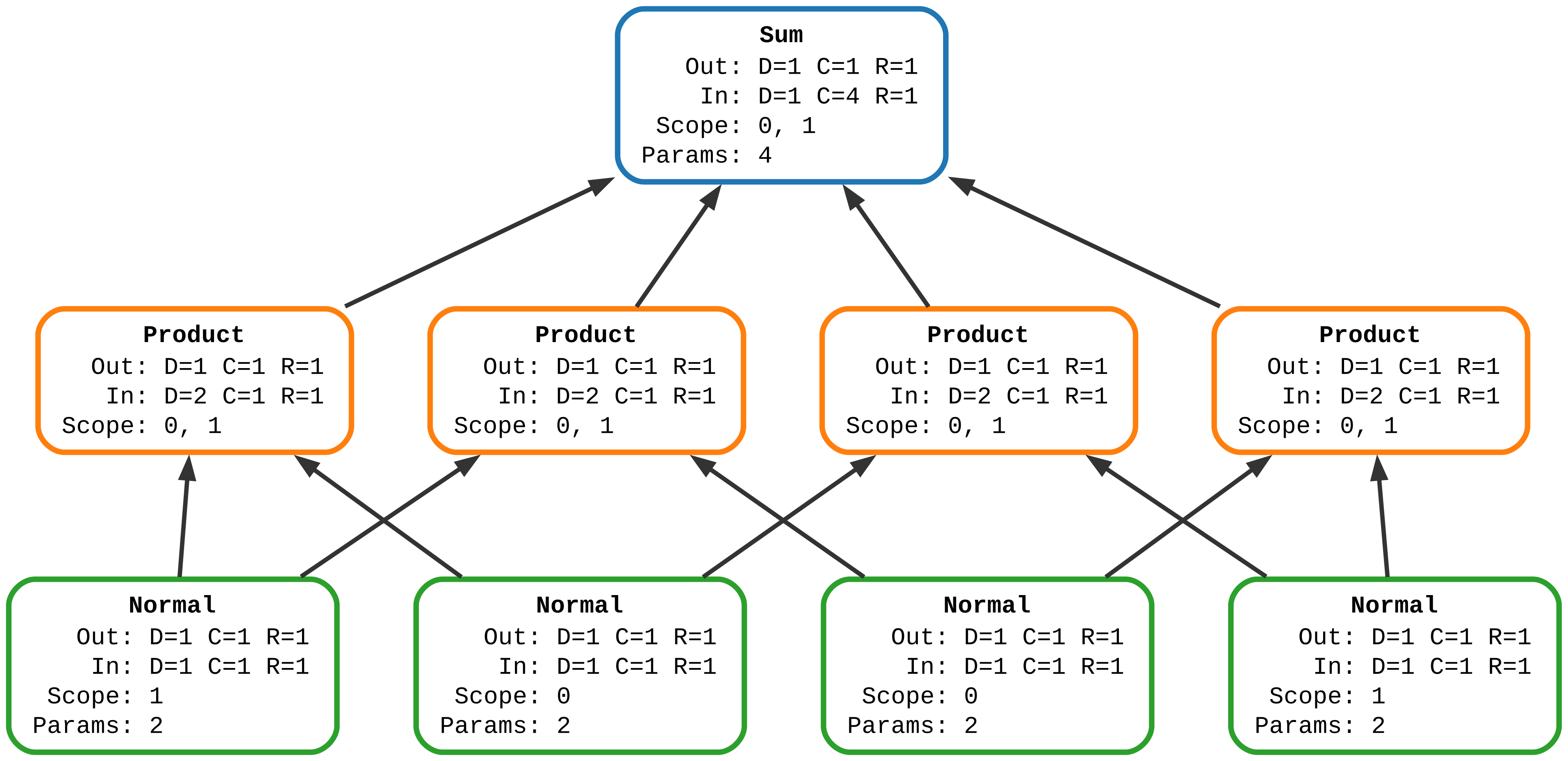
Here’s a comprehensive example showing how to build a Probabilistic Circuit using explicit node-based composition:
import torch
from spflow.modules.sums import Sum
from spflow.modules.products import Product
from spflow.modules.leaves import Normal
from spflow.utils.visualization import visualize

# Create leaf nodes: Normal distributions for two variables (X1 and X2)
# Each variable has multiple instantiations for mixture components
x11 = Normal(scope=0, out_channels=1)  # X1 for component 1
x12 = Normal(scope=0, out_channels=1)  # X1 for component 2
x21 = Normal(scope=1, out_channels=1)  # X2 for component 1
x22 = Normal(scope=1, out_channels=1)  # X2 for component 2

# Create product nodes combining different leaf instances
prod1 = Product([x11, x21])
prod2 = Product([x12, x21])
prod3 = Product([x11, x22])
prod4 = Product([x12, x22])

# Create a sum node (mixture) combining the products
pc = Sum([prod1, prod2, prod3, prod4], weights=[0.3, 0.1, 0.2, 0.4])

# Generate some test data
data = torch.randn(100, 2)

# Compute log-likelihood
log_likelihood = pc.log_likelihood(data)

# Sample from the model
samples = pc.sample(num_samples=50)

# Visualize the probabilistic circuit
visualize(pc, output_path="/tmp/node-based-structure", format="svg")
Layered Module Composition
SPFlow also supports a more compact, layered approach to building circuits using module composition:
import torch
from spflow.modules.products import OuterProduct
from spflow.modules.sums import Sum
from spflow.modules.leaves import Normal
from spflow.modules.ops import SplitConsecutive
from spflow.utils.visualization import visualize

# Create a single Normal layer covering both variables
x_layered = Normal(scope=[0, 1], out_channels=2)

# Use SplitConsecutive to automatically partition outputs, then OuterProduct to combine
prod_layered = OuterProduct(SplitConsecutive(x_layered), num_splits=2)

# Create a sum node over the outer products
pc_layered = Sum(prod_layered, weights=[0.3, 0.1, 0.2, 0.4])

# Compute queries on sample data
x = torch.rand(3, 2)
print(pc_layered.log_likelihood(x))

# Visualize this circuit
visualize(pc_layered, output_path="/tmp/layered-structure", format="svg")
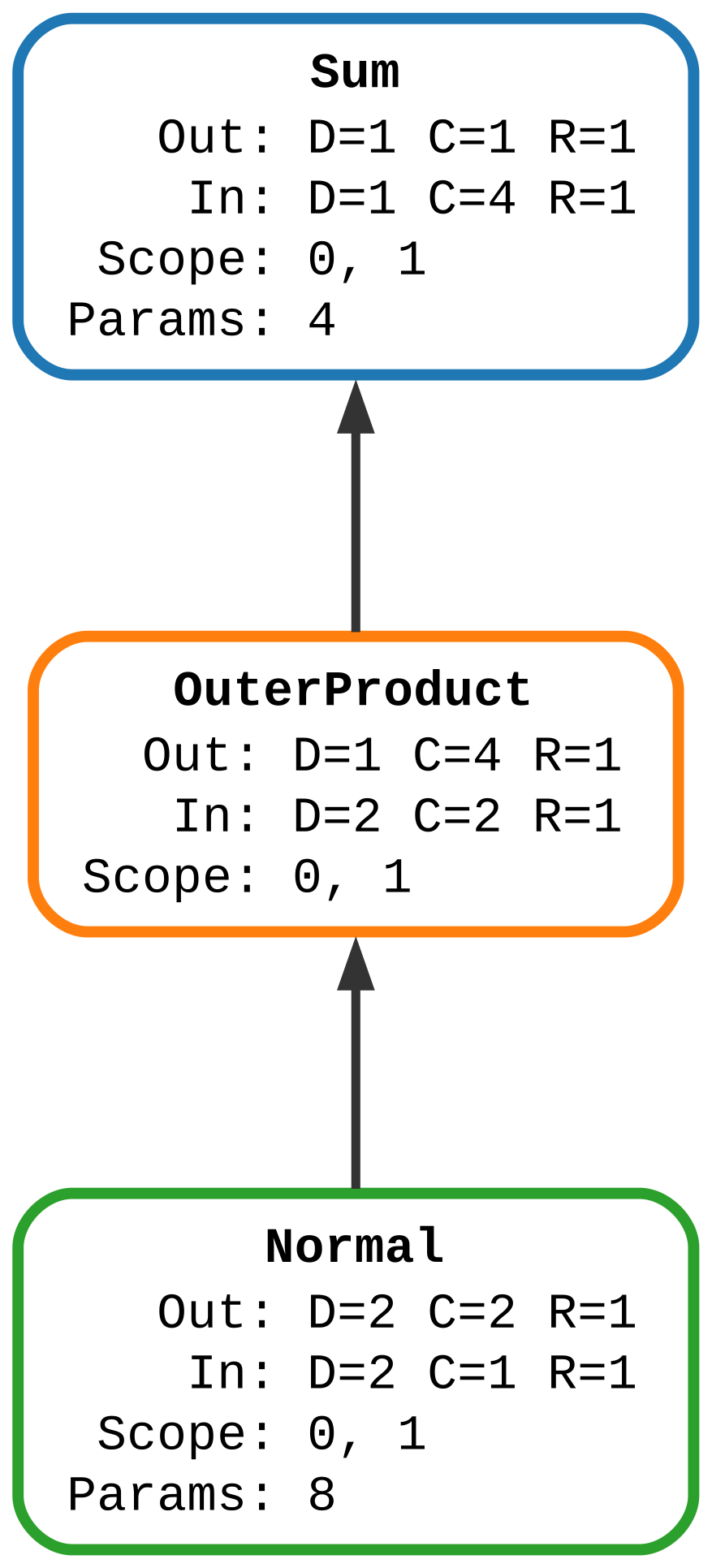
This layered approach is more concise and scales better for larger circuits, automatically handling module composition instead of explicit node construction.
Example DSL Construction (for demos)
SPFlow also includes a tiny, example-oriented DSL for writing small circuits in an algebraic form.
It is intentionally separate from the core spflow.modules API; call .build() to obtain an actual spflow.modules.module.Module.
import torch
from spflow.modules.leaves import Normal
from spflow.dsl import dsl

with dsl():
    terms = 0.4 * Normal(0) * Normal(1) + 0.6 * Normal(0) * Normal(1)
pc = terms.build()
ll = pc.log_likelihood(torch.randn(8, 2))
print(ll.shape)
Next Steps
Read the User Guide for comprehensive tutorials
Explore the API Documentation for detailed API documentation
Browse Concepts for core semantics (shapes, scopes, evidence, caching)
Key Concepts
- Probabilistic Circuits
A flexible class of probabilistic models that support efficient inference.
- Leaves (Distributions)
Terminal nodes representing probability distributions (e.g., Normal, Binomial, Categorical).
- Internal Nodes
Sum and Product nodes that combine distributions in a computational graph.
- Structure Learning
Automatically learning the circuit structure from data.
- Parameter Learning
Training the distribution parameters using gradient descent or EM.
For more information, see the User Guide and Concepts.